


Working from Home Causing Your Secondary Complaints?
It’s no secret that Working From Home (WFH) has its perks and its pains. For many of us, we are starting to tally up the secondary conditions (symptoms) that remote work provides and chalking those up as afflictions that “come with the job” these days. At what point do we sit at our desks, computers illuminating our faces, and ask our Alexas and Googles: How can I improve my posture so that my back doesn’t hurt so much?
The answer is less in the massaging and icing realm and more in the domain of stretching and segmenting time away from the hunchback, WFH life. The tips you can find online for “pain relief” are nearly endless. Below is a list of 5 essential, go-to tips for non-traditional* posture improvements that should target the contributors to your foundational pain while also boosting your workday.
*Non-traditional chiropractic practices such as Florida’s Foundation Chiropractic focuses on the foundation of the body, the “atlas” neck bone located at the upper cervical spine. This unique form of chiropractic differentiates from traditional methods as there is no “cracking” or “popping” of joints involved.
Tips to Improve Your Posture
- Proximity is key. Suppose you’ve ever had to jump from your seat to run to your bedside to grab your charging phone because you forgot about that 9 a.m. meeting. In that case, it may be time to consider organizing your workspace into an easy-to-reach space. Sudden movements like jolting from your seat to find your phone, a Sticky Note or a pen, or the computer charger you shoved in a drawer somewhere can tweak your body in ways that might cause a Foundational Shift. Having everything you can expect to need during the weekday within reach will mitigate unnecessary strain and minimize stress, too.
- The right tools help. Remote meetings can be taxing on your energy and your neck, shoulder, and upper back if you’re opting to hold your phone up to your ear. Whether you scrunch your neck to lock your phone to your shoulder or choose to participate in the old fashioned hand-to-ear approach, the chances are that you are tensing up postural muscles and having them remain in one place for extended periods. Consider switching up your current preferences for alternative methods of communication, like Bluetooth or wired headsets. Other tools that could aid in your workday include wireless mouses and keyboards, an extended display, or a supportive desk chair. The most important thing you can do is monitor your body and consider tools that might help adjust your WFH experience for the better.
- Angles matter. Many-a-times it happens when we are crunching out an email or PowerPoint only to realize we’ve been leaning over our keyboards as if we’ve been typing our social security numbers the entire time. This might be the fallback pose that your body feels most comfortable in a while sitting. Still, honestly, your lower back pain is telling you otherwise. The textbook (or CNN) idea of “good posture” is defined as when your feet are flat on the ground and sit directly underneath your knees, and then also when you roll back your shoulders and lift your chin so your back is straight and your head is raised. You’ll likely feel your body try to slip back into its cross-legged, slumped pose. Trying to correct this habit should have your spine thanking you.
- Move it. Your body isn’t meant to remain in one place for long periods. According to the Hospital for Special Surgery, one hour is considered the maximum time to continue stationary even if you’re comfortable. Scheduling some time into your calendar every hour to walk around and stretch, even if only for five minutes, will help your muscles release tension. (Bonus: it will also help break up the workday.)
- Stretch, and then stretch again. This tip ties into the previous. Whether you’re of the type to wake up and practice yoga throughout the day or are new to targeting pain points in your body through stretching, there’s little dispute on whether you should participate. There are plenty of outlets for learning how to safely stretch different parts of your body, including this lower back pain guide from Healthline.
In Conclusion
Other acclaimed sources for WFH guidelines suggest staying hydrated and exercising regularly will also contribute to a healthy work-life balance in the age of home offices. The above five tips are basics for what you should consider welcoming into this new, or continued, environment. For a more tailored look into your at-home condition, please consider scheduling a complimentary consultation with a trained doctor who looks at your foundation and, if needed, corrects it back to normal.
[/et_pb_text]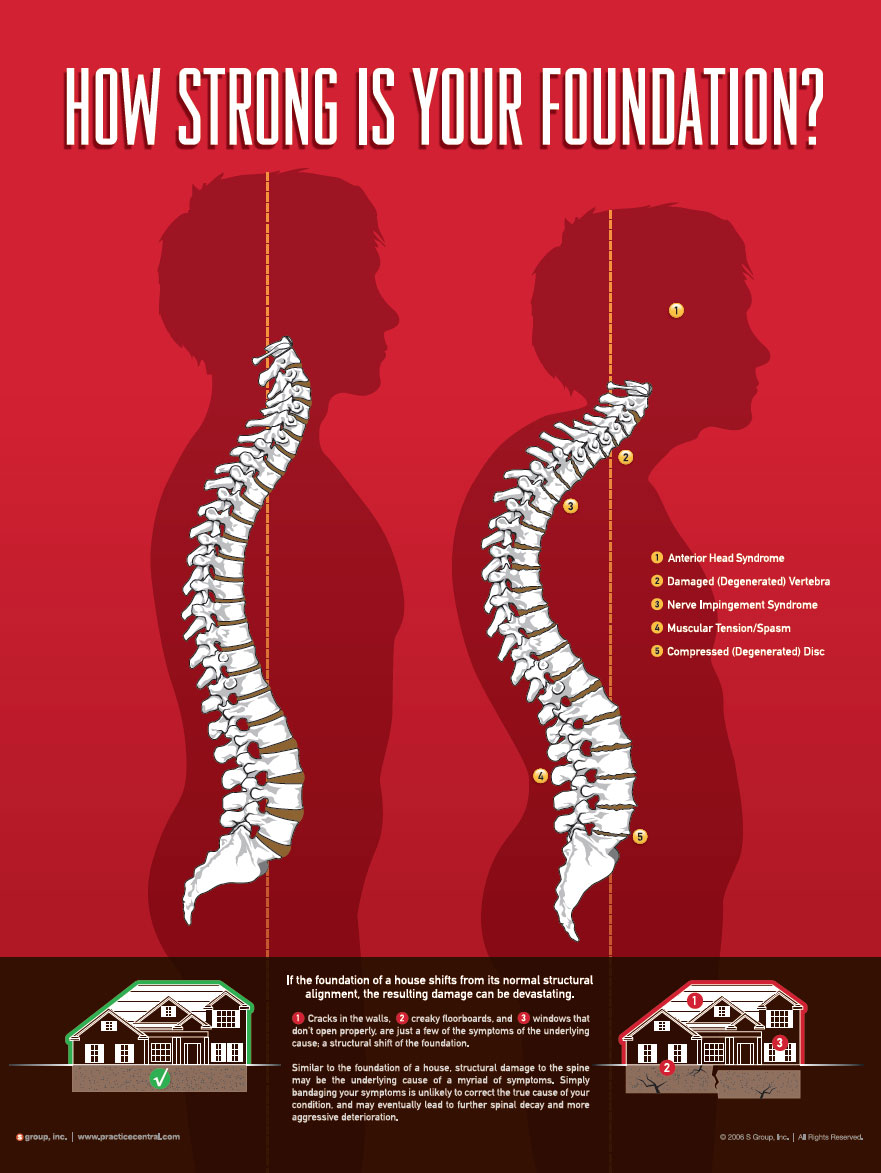
Working from Home Causing Your Secondary Complaints?
It’s no secret that Working From Home (WFH) has its perks and its pains. For many of us, we are starting to tally up the secondary conditions (symptoms) that remote work provides and chalking those up as afflictions that “come with the job” these days. At what point do we sit at our desks, computers illuminating our faces, and ask our Alexas and Googles: How can I improve my posture so that my back doesn’t hurt so much?
The answer is less in the massaging and icing realm and more in the domain of stretching and segmenting time away from the hunchback, WFH life. The tips you can find online for “pain relief” are nearly endless. Below is a list of 5 essential, go-to tips for non-traditional* posture improvements that should target the contributors to your foundational pain while also boosting your workday.
*Non-traditional chiropractic practices such as Florida’s Foundation Chiropractic focuses on the foundation of the body, the “atlas” neck bone located at the upper cervical spine. This unique form of chiropractic differentiates from traditional methods as there is no “cracking” or “popping” of joints involved.
Tips to Improve Your Posture
- Proximity is key. Suppose you’ve ever had to jump from your seat to run to your bedside to grab your charging phone because you forgot about that 9 a.m. meeting. In that case, it may be time to consider organizing your workspace into an easy-to-reach space. Sudden movements like jolting from your seat to find your phone, a Sticky Note or a pen, or the computer charger you shoved in a drawer somewhere can tweak your body in ways that might cause a Foundational Shift. Having everything you can expect to need during the weekday within reach will mitigate unnecessary strain and minimize stress, too.
- The right tools help. Remote meetings can be taxing on your energy and your neck, shoulder, and upper back if you’re opting to hold your phone up to your ear. Whether you scrunch your neck to lock your phone to your shoulder or choose to participate in the old fashioned hand-to-ear approach, the chances are that you are tensing up postural muscles and having them remain in one place for extended periods. Consider switching up your current preferences for alternative methods of communication, like Bluetooth or wired headsets. Other tools that could aid in your workday include wireless mouses and keyboards, an extended display, or a supportive desk chair. The most important thing you can do is monitor your body and consider tools that might help adjust your WFH experience for the better.
- Angles matter. Many-a-times it happens when we are crunching out an email or PowerPoint only to realize we’ve been leaning over our keyboards as if we’ve been typing our social security numbers the entire time. This might be the fallback pose that your body feels most comfortable in a while sitting. Still, honestly, your lower back pain is telling you otherwise. The textbook (or CNN) idea of “good posture” is defined as when your feet are flat on the ground and sit directly underneath your knees, and then also when you roll back your shoulders and lift your chin so your back is straight and your head is raised. You’ll likely feel your body try to slip back into its cross-legged, slumped pose. Trying to correct this habit should have your spine thanking you.
- Move it. Your body isn’t meant to remain in one place for long periods. According to the Hospital for Special Surgery, one hour is considered the maximum time to continue stationary even if you’re comfortable. Scheduling some time into your calendar every hour to walk around and stretch, even if only for five minutes, will help your muscles release tension. (Bonus: it will also help break up the workday.)
- Stretch, and then stretch again. This tip ties into the previous. Whether you’re of the type to wake up and practice yoga throughout the day or are new to targeting pain points in your body through stretching, there’s little dispute on whether you should participate. There are plenty of outlets for learning how to safely stretch different parts of your body, including this lower back pain guide from Healthline.
In Conclusion
Other acclaimed sources for WFH guidelines suggest staying hydrated and exercising regularly will also contribute to a healthy work-life balance in the age of home offices. The above five tips are basics for what you should consider welcoming into this new, or continued, environment. For a more tailored look into your at-home condition, please consider scheduling a complimentary consultation with a trained doctor who looks at your foundation and, if needed, corrects it back to normal.

Recent Comments